S.A.F.E. Shopping: Your Guide to Smarter Social Media Shopping this Holiday Season

Social media is more than just a place for entertainment—it’s become a world-wide shopping mall in your pocket. The global social commerce market is expected to reach $924.47 billion in 2025, growing at an annual rate of 11.8%, according to a May 2025 market intelligence report. Platforms like TikTok and Instagram continue to transform into full-fledged e-commerce ecosystems, making shopping more seamless and interactive than ever.

However, scammers and threat actors can leverage the convenience of shopping on social apps to take advantage of unsuspecting shoppers. This is especially true during the Holiday Season, as consumers ramp up their purchases and look for unique gifts. By following our S.A.F.E. shopping framework, you can enjoy the best of social media shopping while avoiding common pitfalls.

What is S.A.F.E. Shopping?

S – Secure payment
A – Authentic sellers
F – Fraud awareness
E – Educate yourself and empower others


Example of a S.A.F.E. shopping experience:
You’re scrolling on social media and see a video of an artist making custom shirts. The original video links directly to their in-app shop where you can read verified reviews and clear shipping policies. You use a secure payment gateway to place your order and when the shirt arrives, it looks just like the photos.

S. Secure Payment

Safe shopping starts with secure payment processing. You can protect your banking information by always using trusted and secure payment gateways.

How to know you’re using a secure payment gateway:

  1. Look for HTTPS in the URL: Websites starting with https:// encrypt or protect your payment information.
  2. Look for the padlock: Always check for the padlock symbol in the top left of your browser bar—it means the site is secure.
  3. Shop and pay in the same place: TikTok Shop, Instagram Shop, and PayPal all keep your payment and shipping information encrypted (protected) within their apps. Protect your payment information by completing your purchase inside the social media app.
  4. Use trusted payment methods: PayPal, Apple Pay, Google Pay, Square, Shopify, and Square are examples of trusted online payment processors.

A. Authentic Sellers

Not every seller on social platform shops is legitimate.

Verify your seller and avoid fake accounts by looking for:

  1. Verification badges: Look for verified sellers by checking for verification badges on social media apps.
  2. Strong reviews: Read reviews and comments from across the internet. A lack of reviews is a bad sign!
  3. Online presence: Do a quick search to see if the seller has a legitimate website or social media presence on other platforms.

F. Fraud Awareness

Fraudulent sellers often use similar tactics on social media to attract victims.

Avoid fraud by building awareness of these common red flags:

  1. Too good to be true: Beware of shockingly low prices or extravagant product claims.
  2. Vague descriptions: Missing or poorly written product descriptions can hint to low-quality or fraudulent items.
  3. External links: Avoid sellers who redirect you off of the social media app to unfamiliar websites where you need to re-enter your payment information.

Example of a fraudulent and unsafe shopping experience:
You click a TikTok Shop ad selling 80% off “high-quality leather boots” for the next two hours only! The link redirects you to an unknown website where you need to re-enter your shipping and payment information. After placing the order, your boots arrive weeks late and look nothing like the video. Now, you’ve started to get unauthorized charges on your credit card.

E. Educate Yourself & Empower Others

The power of social media can help others avoid scams and find trustworthy sellers.

  1. Read platform policies: Know the refund and buyer protection policies of the app you’re using. (TikTok) (Instagram) (Facebook).
  2. Leave honest comments: If you’ve had a bad experience with a seller, leave a polite but honest comment on their post. Sharing positive shopping experiences helps educate others.
  3. Spread awareness: If you spot a scam, report it on the app.

Got Scammed?

Don’t be embarrassed. You’re not alone—social media scams accounted for $1.4 billion in losses in 2023.

Follow these simple steps to protect yourself and others.

  1. ❗ Report it using the platform’s reporting tool.
  2. Contact your bank to freeze your card and dispute unauthorized charges.
    • Call the customer service number on the back of your card.
  3. Spread awareness by sharing your story and empowering others to avoid these common traps.

5 Reasons You Need a vCISO

Cyber risk has become more than a technical issue. It’s a business reality with contractual, financial, and reputational stakes. For mid-sized organizations, that pressure often lands on the IT director or MSP partner, who’s suddenly expected to handle compliance, vendor assessments, and board-level risk reporting all on top of keeping the lights on.

A Virtual Chief Information Security Officer (vCISO) bridges that gap. If your organization has between 100 and 2,000 employees and you’re navigating frameworks like ISO/IEC 27001:2022, NIST CSF 2.0, PCI DSS v4.0, or HIPAA, a vCISO can bring the necessary structure, expertise, and measurable results to your cybersecurity program.

With a vCISO, you’ll get executive-level security leadership, covering governance, compliance, and strategy without the overhead of hiring a full-time, in-house CISO.

Book a Consult to see how IT Solutions’ vCISO services can align your security posture with your business goals.

The Business Problem a vCISO Solves

Many growing organizations share the same set of challenges:

  • Escalating audits and customer questionnaires: without anyone clearly accountable for security governance.
  • Tool sprawl and alert fatigue: multiple dashboards, limited insight, and no defined roadmap.
  • Budget pressure: to deliver security outcomes without expanding headcount.

A vCISO answers those challenges by owning the program leadership role, turning scattered efforts into a measurable, framework-aligned strategy.

Learn more about our Cybersecurity Services.

What Does a vCISO Do?

A vCISO provides executive-level security leadership on a fractional basis, defining strategy, governing risk, aligning controls, and translating security data into clear business decisions.

A professional serving in a vCISO capacity will oversee:

  • Security charter and program governance structure
  • Risk register and risk appetite definition
  • Policy stack and control mapping to standards
  • Vendor/third-party risk assessments
  • Incident Response Plan (IRP) and tabletop exercises
  • KPI and board-level reporting (e.g., MTTD, MTTR, control coverage)

Five Reasons to Choose a vCISO

  1. Optimize Existing IT and Security Investments: A vCISO helps you get more from the tools and services you already own. Instead of recommending a costly rip-and-replace, they rationalize your SIEM, EDR/XDR, IAM, and email security stack, eliminating redundancy and improving return on investment.
  2. Support Compliance and Audit Readiness: A vCISO ensures you have documented controls, evidence plans, and a path to continuous compliance, whether your customers require ISO 27001, NIST CSF, PCI DSS, or HIPAA.
  3. Strengthen Posture with a Defined Security Roadmap: A vCISO provides proactive direction through 90-day and quarterly roadmaps that outline risks, owners, budgets, and prioritized improvements.
  4. Gain Strategic Insight from Security Signals: A vCISO interprets SOC and SIEM data, Dark Web findings, and vulnerability reports, distilling them into actionable intelligence that reduces noise and speeds response.
  5. Get Board-Level Leadership Without the Full-Time Overhead: A full-time CISO can exceed $250,000 annually. A vCISO delivers comparable executive direction at a fraction of the cost while still providing ongoing oversight and quarterly reporting.

Do We Need to Start from Scratch?

No. A vCISO improves what’s already in place, from your policies and tools to your processes. From there, they identify quick wins and prioritize gaps that deliver immediate improvement.

Early activities include:

  • Tool rationalization and configuration review
  • Policy refresh and alignment to frameworks
  • Identification of top-10 security gaps
  • Quick-win initiatives for measurable risk reduction

What Size Company Needs a CISO or vCISO?

A vCISO offers the right balance for most small-to-mid-sized organizations, bringing expert guidance while providing measurable outcomes and lower fixed costs compared to a full-time CISO.

If you’re facing customer security audits, handling regulated data, expanding into the cloud, or have experienced a recent incident, you need a CISO-level function.

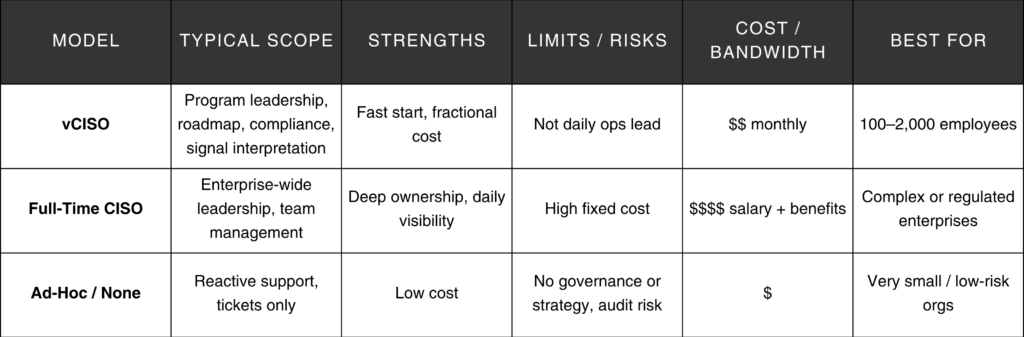
vCISO vs. Full-Time CISO vs. Ad-Hoc IT

chart that breaks down the different levels of a vCISO along with pros and cons.

How to Start with a vCISO

90-Day Checklist

  1. Confirm your drivers: audits, contracts, recent incidents, or customer demands.
  2. Define success metrics such as MTTD, MTTR, audit milestones, or control coverage.
  3. Baseline your controls against your chosen framework (CSF 2.0, ISO 27001, PCI DSS, HIPAA).
  4. Identify top 10 gaps and assign ownership.
  5. Develop a Security Roadmap with prioritized initiatives, timelines, and budgets.
  6. Set up a risk register and establish a monthly operations cadence with quarterly board reporting.
  7. Review SOC/SIEM and Dark Web findings, translating insights into defined playbooks and ticket workflows.

By day 90, you’ll have an executable plan tied to your business outcomes with a fully operational governance structure and documented risks.

Risks and Trade-offs

  • Misaligned expectations: Start with a written charter and defined KPIs.
  • Over-automation: Maintain human oversight for high-impact actions to avoid policy drift.
  • Tool sprawl persistence: Adding new tools isn’t always the answer. Commit to rationalization.
  • Daily presence: A full-time, in-house CISO may be more appropriate if you need someone on-site managing a large team.

When to Get Expert Help

If you’re preparing for your first major compliance audit, struggling with vendor questionnaires, or need a roadmap your leadership team can understand, a vCISO engagement delivers clarity and measurable progress.

Book a vCISO Readiness Consult and start building your 90-day plan today.

Frequently Asked Questions

  • What specific deliverables should we expect in the first 90 days?
    • A program charter, risk register, updated policy set, SOC/SIEM and Dark Web reviews, KPI dashboard, and a board-ready summary.
  • Will a vCISO replace our MSP or IT team?
    • No. The vCISO provides governance and strategy, while your MSP or IT staff executes tactical activities under that direction.
  • How do you measure success?
    • Success is tracked through framework-aligned milestones, including audit readiness, MTTD/MTTR reduction, control coverage, and closure of vendor risks.

What is CMMC? Levels, Requirements & Timelines Explained

The Cybersecurity Maturity Model Certification (CMMC) is how the U.S. Department of Defense (DoD) verifies that contractors protect FCI (Federal Contract Information) and CUI (Controlled Unclassified Information). It shows up in contract language and gets phased into awards. The DoD is enforcing these requirements as of November 10, 2025 so if you don’t meet the designated level and record it in SPRS you can be ruled ineligible, losing out on business.

  • Three levels map to the sensitivity of what you touch: basic FCI (Level 1), CUI (Level 2), and higher-risk programs (Level 3).
  • The final rule codifies CMMC at 32 CFR Part 170 and became effective December 16, 2024, with a phased rollout over three years via DFARS clauses.

Which CMMC level do I need?

If you only handle FCI, you’re generally looking at Level 1 with an annual self-assessment. If you handle CUI, you’ll need Level 2 (sometimes self-assessment, sometimes a C3PAO). The most sensitive work is Level 3, assessed by the government (DIBCAC). Always check the solicitation and flow-downs.

  • FCI (Level 1): information provided or generated for the Government under a contract that isn’t intended for public release (safeguarded under FAR 52.204-21). 
  • CUI (Level 2): unclassified information requiring safeguarding per 32 CFR Part 2002 and the NARA CUI Registry (category definitions/markings).
  • High-risk CUI/APT (Level 3): selected enhanced protections from NIST SP 800-172 with a government (DIBCAC) assessment every 3 years; limited POA&Ms and stricter evidence expectations. NIST SP 800-172; DoD DIBCAC.

CMMC levels at a glance

A Comparison Chart of CMMC Levels 1, 2, and 3.


Book Consult  | Explore our Cybersecurity Services

How CMMC relates to NIST SP 800-171 Rev. 3

Right now, CMMC Level 2 is still formally mapped to NIST SP 800-171 Rev. 2 in DoD documentation and contracts. Rev. 3 has been finalized, but it has not yet been formally enforced by DoD for CMMC purposes. Most observers expect Rev. 3 to become the required baseline in a future rule or update.

In practical terms, that means:

  • Level 2 = NIST SP 800-171. To pass Level 2, you implement the 110 requirements in 800-171 Rev. 3 and show your work using 800-171A assessment procedures.
  • Level 3 adds 800-172. That’s where the DoD pulls in targeted, enhanced protections for programs facing more advanced threats.
  • Level 3 adds selected enhanced protections from NIST SP 800-172 for programs at higher risk from APTs. 


Where IT Solutions fits in: We focus on Level 1 and Level 2. We begin with a CMMC Compliance Gap Assessment to outline the project area (usually by separating a CUI enclave to reduce effects), find areas where you don’t meet the current standard, and give you a list of important recommendations and actions to take next. Following the assessment, our vCISO Cybersecure Regulatory team can partner with you to strategically close gaps, mature your security program, and help you move toward CMMC certification.


Do I need a third-party assessment (C3PAO)?

Level 1 is an annual self-assessment. Level 2 can be a self-assessment or a C3PAO certification, depending on contract demands. Level 3 is assessed by DIBCAC (a DoD team), not a C3PAO. If you’re bidding soon, verify the assessment type now to avoid a schedule crunch.

A couple of practical notes:

  • Cyber AB maintains the C3PAO marketplace.
  • Even for self-assessments, keep your evidence organized because you’ll need it for SPRS and potential government validations.


Timelines & Rollout

The CMMC rule was finalized in September 2025 and is enforceable as of November 10, 2025, with a three-year phased rollout across new DoD contracts. Your timeline depends on current 800-171 gaps, how quickly you can harden controls, how fast you can produce evidence, and, if required, when you can get on a C3PAO calendar. Count on several months for remediation plus assessor lead time.

The reality for most Level 2 teams:

  • Gap closure: Often measured in months, not weeks, especially for identity, logging, incident response, and vulnerability management.
  • Assessment lead times: If a C3PAO is required, book early.
  • POA&M windows: Limited and time-boxed; don’t count on long grace periods.


How to get ready

Readiness Steps

  • Scope your world. Identify whether you handle FCI, CUI, or both. Draw a hard boundary for in-scope systems; consider a CUI enclave to minimize disruption elsewhere.
  • Conduct a compliance gap assessment. Work with your IT vendor to compare your current practices to NIST 800-171 Rev. 3, document results in your SSP and POA&M using 800-171A methods, and get a prioritized remediation roadmap.
  • Prioritize the big rocks. MFA everywhere it should be, good logging and monitoring, incident response you can actually execute, strong access control, and a living vulnerability management rhythm.
  • Post (and maintain) your SPRS score. Use PIEE to record your 800-171 self-assessment score. Contracting officers check it.
  • If required, schedule the assessment. For Level 2 solicitations that mandate certification, line up a C3PAO and prep objective evidence. Level 3 is DIBCAC territory.
  • Close POA&Ms fast. They’re allowed in limited fashion and on a clock. Track owners and due dates.
  • Sustain. Plan on 3-year certification cycles (where applicable), plus annual affirmations, and keep your artifacts fresh.


Want a quick reality check on scope, score, and schedule? Book Consult


SPRS, DFARS clauses, and your bid status

  • SPRS is the scoreboard. It’s where your 800-171 score (and, when applicable, CMMC status) lives. No current score/affirmation when the clause applies? Expect trouble at award time.
  • DFARS 252.204-7019/7020/7021 are the levers that make this real in solicitations and subcontracts. They call for SPRS posting, potential government assessments, and, when required, a current CMMC certificate.
  • Flow-down matters. If you’re a prime, your suppliers can become your risk. If you’re a sub, expect primes to pressure-test your status.


Risks & trade-offs

  • Eligibility risk: Missing the required level or a current SPRS entry can knock you out of the running.
  • Budget & time: Remediating to Rev. 3, producing evidence, and scheduling an assessment can be non-trivial, so plan accordingly.
  • Scope strategy: Enterprise-wide compliance vs a CUI enclave is a classic “cost vs friction” decision.
  • Supply chain: Requirements flow down. Vet subs early or your weakest link can become a blocker.


When to bring in help

If you touch CUI, have a low or negative SPRS score, or you’ve got a near-term bid, it’s time. We’ll map DFARS and NIST to a concrete plan, including scope, enclave design, SSP/POA&M, and evidence collection, and help you coordinate with a C3PAO when certification is required.

Book a CMMC Readiness Consult


Frequently Asked Questions

  • What is SPRS and why does it matter?
    • It’s the Supplier Performance Risk System, where your NIST 800-171 score (and CMMC status) is recorded. Contracting officers look there to confirm eligibility and risk posture.
  • What’s the difference between FCI and CUI?
    • FCI is non-public contract information that must be safeguarded under basic controls. CUI is unclassified but sensitive information with stricter handling rules. Handling CUI will often trigger CMMC Level 2.
  • Are POA&Ms allowed?
    • Yes, but only in a limited way at Levels 2/3 and with tight closeout windows. Don’t rely on POA&Ms for foundational controls.
  • Does Level 2 always require a C3PAO?
    • We use ITIL-aligned change enablement: categorize risk, require approvals, schedule windows, and define backout plans. Post-change reviews feed continuous improvement.
  • How do Ontario regulations affect our stack?
    • Not always. Some Level 2 awards accept a self-assessment; others require a C3PAO. The solicitation is the source of truth so confirm early.

What We Mean When We Say “Enterprise-Level” Managed IT

Enterprise-level managed IT support isn’t about the size of your company—it’s about the outcomes you need. In practice, it means reliability targets you can measure, security controls you can audit and rely on, and change processes that don’t break production. This guide explains what “enterprise-level” really covers, why it matters in Ontario first (and across North America), and how IT Solutions delivers it without enterprise-only price tags.

What “Enterprise-Level” Really Means

Enterprise-level managed IT means outcomes: documented SLOs, 24/7 monitoring and response, formal change enablement, and security mapped to recognized frameworks (e.g., NIST CSF, CIS Controls, HIPAA, etc.), plus compliance support and vendor governance. It’s not about company size; it’s about risk, reliability, and scale.

The Core Capabilities You Should Expect

  • SLO-driven reliability: Define service level objectives (SLOs) so uptime and response are measurable and reportable.
  • 24/7 monitoring & incident response: Proactive detection, on-call runbooks, and post-incident reviews.
  • Framework-aligned security: Controls mapped to NIST CSF 2.0 and CIS Controls v8.1, with a Zero Trust roadmap.
  • Change enablement: ITIL-aligned planning, risk assessment, approvals, and backout plans for changes.
  • Asset & lifecycle management: Standard images, automated patching, and governed configurations.
  • Compliance support: Help aligning with PIPEDA/CASL in Canada; sector-specific needs (e.g., PHIPA for Ontario health), and SOC 2 readiness for service orgs.
  • Vendor & cloud governance: Contract reviews, least-privilege access, and identity controls across SaaS/IaaS.
  • Documentation & transparency: Playbooks, diagrams, and customer-visible reporting.


AI Governance Graphic

C-Suite leaders set the tone for resilience. Discover how Mastering Incident Response Drills: Best Practices & Key Metrics equips executives to measure, test, and strengthen their response strategy.


Ontario-first Considerations (and why they matter everywhere)

  • Privacy & data handling: Private-sector organizations operating in Canada must handle personal information under PIPEDA; Ontario health data may be subject to PHIPA.
  • Commercial messaging: CASL governs consent and record-keeping for electronic messages; your CRM, email, and ticketing workflows should support compliance.
  • Practical baseline: The Canadian Centre for Cyber Security publishes baseline controls that map well to SMB environments and are a sensible starting point.


Do 50 – 200-person firms need “enterprise-level” IT?

Yes—if you store customer data, run cloud apps, or face uptime commitments. Framework-mapped controls, change management, and SLOs reduce breach risk and downtime while making compliance audits faster.

Comparison: Enterprise-Level Managed IT vs. Basic Coverage

 
Decision Criterion Enterprise-Level Managed IT (What “good” looks like) Basic MSP (Break-Fix) Why It Matters
Reliability guarantees Written SLOs (response, restoration, change windows) Uncertain response expectations You can measure performance and hold providers accountable.
Security framework Controls mapped to NIST CSF/CIS; Zero Trust roadmap; MFA everywhere Ad hoc hardening; limited strategy Lowers breach likelihood and speeds audit readiness.
Change management ITIL change enablement with approvals and backouts Patch when convenient Reduces outages from routine changes.
Compliance support Evidence packs for PIPEDA and CASL; SOC 2 readiness guidance Minimal documentation Faster questionnaires and lower audit friction.
Monitoring and incident response 24/7 monitoring, playbooks, post-incident reviews Business-hours tickets Faster detection and recovery cut downtime costs.
Asset and patch lifecycle Standard images, automated patch SLOs, configuration baselines Manual updates; outdated assets Predictable, consistent endpoints reduce risk.
Vendor governance Access reviews, least-privilege, contract and SLO checks Informal oversight Limits third-party risk and surprise costs.

How IT Solutions Delivers “Enterprise-Level” without Enterprise Overhead

  • Assess & align: Baseline against CIS Controls and NIST CSF 2.0; identify quick wins vs. strategic gaps.
  • Define SLOs that matter: Translate business goals (e.g., “same-day order fulfillment”) into SLOs (response, restoration, change windows).
  • Harden & monitor: Implement MFA, identity hygiene, patch SLOs, and 24/7 monitoring with runbooks and escalation paths that scale with you.
  • Control change: ITIL-aligned change enablement to plan, approve, and audit changes—no “Friday-night surprises.”
  • Prove it: Evidence artifacts and monthly reporting so you can answer customers, auditors, and boards with confidence.

When to Involve an Expert

Bring in an expert if you can’t map your controls to a framework, if you lack change governance, or if uptime/response targets are unclear. An external team accelerates baselining, fills skill gaps, and gives you audit-ready documentation without slowing projects.

Contact us today
Let’s translate your business commitments into measurable SLOs and a security roadmap aligned to NIST CSF, CIS Controls, and your regulatory needs. Micro-proof: Our process is framework-backed and built for SMBs that need enterprise-level outcomes without enterprise overhead.


Frequently Asked Questions

  • What SLOs should we ask for?
    • Start with response, restoration, and change windows that align to business impact. Keep the set small, measurable, and revisited quarterly as systems and customer expectations evolve.
  • Can you help with SOC 2 readiness?
    • Yes. We map your existing controls to SOC 2 Trust Services Criteria, identify gaps, and prepare evidence packs for your auditor. We don’t issue reports—that’s your auditor’s role—but we accelerate preparation.
  • Is Zero Trust realistic for SMBs?
    • Absolutely. Begin with identity: phishing-resistant MFA, conditional access, and least privilege. Then phase in network segmentation and continuous verification over time.
  • How do you handle change risk?
    • We use ITIL-aligned change enablement: categorize risk, require approvals, schedule windows, and define backout plans. Post-change reviews feed continuous improvement.
  • How do Ontario regulations affect our stack?
    • PIPEDA governs personal information handling, PHIPA applies to Ontario health information, and CASL sets rules for electronic messaging. We align controls and workflows to support compliance obligations.

Network Optimization for Law Firms: Practical Strategies

Working at a law firm, you know how fast things move and how much your team depends on technology to keep pace. Your network is doing a lot of the heavy lifting behind the scenes, pulling up case files, shouldering multiple remote client meetings and filing motions online.

When that network lags or goes down, everything stalls. Deadlines get tighter. Frustration rises. And productivity takes a hit.

At IT Solutions, we help law firms avoid that scenario. We take a thoughtful, step-by-step approach to making your network faster, more reliable and better equipped to support your team. In this post, we’ll walk through how we do that, from our first look at your setup to the long-term strategy that keeps your network running at its best.

Why Network Performance Matters More Than You Might Think

Legal work brings some unique network challenges, such as:

  • Moving large files like exhibits and scanned PDFs
  • Giving attorneys secure, smooth access from outside the office
  • Keeping older systems and cloud tools working together
  • Protecting sensitive data with high-security standards

Most of the time, you probably don’t think about your network. That is, until it gives you a reason to, like when a file won’t upload, a video call freezes, or a login times out. These little disruptions add up and can slow down your entire team.

When your network isn’t optimized to handle all of this, it shows. Things take longer, connections break and your team ends up working around the technology instead of with it.

What Network Optimization Really Looks Like

Optimizing a network isn’t about buying a bunch of new gear or making one big change; it’s a thoughtful and methodical process. What’s working? What’s slowing you down? From there, it’s all about building the right systems to perform under pressure and making sure those systems can adapt as your firm grows and evolves.

Here’s how we approach it:

Step 1: Network Assessment

We start with an assessment to make sure we understand your current setup. We’ll take inventory of your devices, connections and the software your team relies on every day. We’ll also gather baseline metrics, including latency (how fast data moves), throughput (how much data flows at once) and packet loss (when pieces of data don’t make it to their destination) to evaluate for any vulnerabilities and inefficiencies.

Step 2: Design for Speed and Stability

We take all of the information gathered during the assessment and use it to design a smarter and stronger network. That often means adjusting how data flows, ensuring your most critical tools (like case management systems or video calls) always get top priority.

We may recommend:

  • Quality of Service (QoS) settings that prioritize important traffic
  • SD-WAN technology to keep multiple offices connected efficiently
  • Redundant links and failover systems so your network stays online, even if something goes down

The goal is a setup that performs well under pressure and bounces back quickly if something goes wrong.

Step 3: Manage Bandwidth Like a Pro

Not all network traffic is created equal. We help law firms make sure the bandwidth goes where it’s needed most.

For example, we can:

  • Reserve more bandwidth for high-priority applications like e-filing or remote desktops
  • Schedule big updates or backups for off-hours, so they don’t slow down your team during the work day

It’s all about working smarter, not just throwing more resources at the problem.

Step 4: Monitor in Real Time (So You’re Not Caught Off Guard)

One of the most valuable things we do is keep a close eye on your network. We use tools that track performance in real time and alert us the moment something looks off.

This allows us to:

  • Spot slowdowns or bottlenecks before they become major issues
  • Send automated alerts when thresholds are crossed
  • Provide easy-to-understand reports that show how your network is doing over time

This kind of visibility makes it easier to plan, adjust, and avoid surprises.

Step 5: Fine-Tune Devices and Wireless Access

Even the best-designed network can get tripped up by a slow laptop or a poorly configured Wi-Fi connection.

We make sure:

  • Your team’s devices are running the latest firmware and drivers
  • Wireless networks are secure, stable, and strong throughout your space
  • Remote users have optimized VPN setups for fast, secure access wherever they’re working

Even a fix as simple as a settings tweak can make a big difference in everyday performance.

Step 6: Balance Security with Speed

Law firms can’t afford to compromise on security. But protective tools shouldn’t bring your network to a crawl either.

We help strike the right balance by:

  • Installing next-gen firewalls that protect without slowing things down
  • Using SSL inspection and caching wisely to reduce load times without sacrificing safety

Security is essential, but it shouldn’t be a tradeoff for usability.

You Don’t Have to Figure This Out Alone

Knowing what to upgrade and what to leave alone is half the battle. And with so many providers and tools out there, it’s easy to get overwhelmed or end up with something that doesn’t quite fit.

That’s where we come in. At IT Solutions, we help law firms make smart, informed decisions about things like:

  • Whether SD-WAN is the right fit to keep multiple offices connected
  • How reliable your current internet carrier’s uptime really is
  • When network hardware should be replaced and when it’s still going strong

Most importantly, we make sure everything is installed, configured, and tested the right way, so your team experiences the difference immediately.

Optimization Isn’t a One-and-Done Project

Just like your firm grows and evolves, your network needs to do the same. More users. Bigger files. Different work patterns. It all adds up over time.

That’s why we stay involved, offering:

  • Regularly scheduled performance audits to keep things running smoothly
  • Capacity planning to make sure you’re ready for what’s ahead
  • Ongoing updates and tuning so your network never falls behind

This way, it’s not about reacting to problems; it’s about staying a step ahead.

Why It Matters

We know this isn’t about technology for technology’s sake. It’s about making life easier for your team. It’s about fewer disruptions during client meetings, faster access to the information you need, and smoother collaboration no matter where your attorneys are working from.

A well-optimized network helps your firm:

  • Avoid costly downtime
  • Work more efficiently
  • Deliver better service to clients

That’s the kind of tech investment that pays off every single day.

Let’s Talk About Your Network

Learn more about how our team supports law firms like yours every day. If your firm’s network could use a tune-up or if you’re just not sure where to start, we’re here to help. 

Frequently Asked Questions

Which performance metrics should law firms track to gauge network health?
At IT Solutions, we monitor key metrics such as latency (round-trip time), jitter (variation in packet delay), packet loss percentage, and throughput (bandwidth utilization). We also track application-specific response times for critical systems like document management and e-filing to ensure SLAs are consistently met.

How do I choose between MPLS, SD-WAN, or hybrid connectivity for my firm’s offices?
We evaluate your firm’s locations, bandwidth requirements, and budget. For highly sensitive data flows and guaranteed SLAs, MPLS may be ideal. SD-WAN offers cost-effective, dynamic path steering over broadband, while a hybrid model combines both to optimize performance and redundancy—our team pilots these options in a proof-of-concept to determine the best fit.

What are best practices for ensuring secure, high-speed VPN access for remote attorneys?
We deploy next-gen VPN gateways with split-tunneling for critical app traffic and full encryption for sensitive data. By colocating VPN concentrators in our private cloud and leveraging optimized TLS stacks, we minimize latency. We enforce MFA and endpoint posture checks before granting access.

How can we minimize performance impacts of cloud-based legal applications like e-discovery platforms?
We implement QoS to prioritize e-discovery and other high-value traffic, and leverage WAN optimization appliances that compress and dedupe data in transit. Caching proxies for repetitive queries further reduce round trips, delivering faster load times without additional bandwidth.

What role do content-delivery or caching solutions play in speeding up document access?
CDN and local caching appliances store frequently accessed resources—like large PDFs or precedent libraries—closer to users. This reduces hops and load on your core network. IT Solutions integrates these caches with your document management system for transparent acceleration.

How do we budget and plan for network upgrades without disrupting ongoing cases?
We develop a phased roadmap tying upgrade milestones to firm-wide downtime windows (e.g., off-hours or weekends). Our cost model breaks out hardware, licensing, and professional services, allowing you to forecast expenses over multiple fiscal periods and avoid lump-sum hits.

What monitoring tools integrate seamlessly with existing legal-practice management software?
We use platforms like SolarWinds and PRTG that support custom probes and APIs to pull performance data directly into dashboards alongside metrics from Clio, iManage, or Elite. This unified view correlates network health with application performance for faster root-cause analysis.

How often should we revisit QoS policies as our application mix evolves?
We recommend quarterly reviews of QoS policies, or immediately after deploying a major new application. IT Solutions conducts quarterly traffic analysis to adjust priority queues and bandwidth allocations, ensuring critical legal workflows always receive top priority.

What strategies ensure consistent Wi-Fi performance in client-facing conference rooms?
We implement enterprise-grade access points with band steering and load balancing, ensuring devices seamlessly roam between radios. Site surveys guide optimal AP placement, and we reserve specific SSIDs with dedicated SSID profiles and bandwidth limits to prevent guest traffic from affecting attorney connections.

How can we quantify ROI from network performance improvements in terms of billable-hour gains?
We track metrics like reduced downtime incidents, faster document retrieval times, and lower average ticket resolution times. By correlating those improvements with billable rates and utilization data, we demonstrate how network optimizations translate into incremental revenue and productivity gains.

Cybersecurity Audit Best Practices for Law Firms

When working with your law firm, clients count on you to protect their legal interests, including their most sensitive personal and business information.

Unfortunately, the legal industry has become an increasingly popular target for cyberattacks. From contracts and case files to privileged communications, the data your firm handles every day is a goldmine for cybercriminals. 

One of the smartest steps you can take if you’re wondering whether your firm is doing enough to protect client data is to conduct a cybersecurity audit. The results will give you a clear picture of your current security standing, uncover hidden risks, and help ensure you stay compliant with ethical rules and privacy laws.

Let’s break down what makes a good audit, including what it should cover and how you can use it to strengthen your defenses without overwhelming your team.


Why Law Firms Are a Big Target

Why are law firms such prime targets for cybercriminals? It’s simple. Law firms have what hackers want. You work with high-value, confidential information. Whether your practice areas focus on mergers, litigation, intellectual property, or estate planning, it all entails working with sensitive data that would be disastrous in the wrong hands.

What makes firms even more vulnerable is that many don’t have full-time IT staff or even formal security protocols in place. That, combined with more people working remotely and using cloud-based tools, creates easy openings for things like:

  • Phishing emails
  • Ransomware attack
  • Insider threats
  • Compromised third-party vendors

All it takes is one click on a bad link or one misconfigured setting to create a breach.


You’re Also Required to Protect That Data

The ABA’s Model Rule 1.6 requires lawyers to make “reasonable efforts” to protect client information, so cybersecurity isn’t just a smart idea, it’s part of your professional obligation. 

Depending on where you practice and who your clients are, laws like the GDPR and CCPA may also apply. And if you’re handling healthcare data, financial records, or working across state or international lines, things can get complicated.

A solid cybersecurity audit can help keep you on the right side of ethics rules, privacy laws, and your clients’ expectations.


What a Cybersecurity Audit Should Look Like

A good audit isn’t just a technical exercise; it’s a chance to evaluate how your firm handles security across the board. Here’s how to approach it:

  1. Set Clear Goals: Start by defining why you’re doing the audit. Knowing your “why” helps shape the rest of the process. Are you trying to meet compliance requirements? Reduce risk? Check your systems after a recent update?
  2. Get the Right People Involved: You’ll want both legal and technical experts on the team. That might include your internal IT lead, your managing partner, or even an outside cybersecurity expert, especially to gain objectivity and specialized skills.
  3. Take Inventory: Create a list of where client data is stored and accessible, including: file servers, laptops, cloud drives, mobile devices, email accounts, etc. Don’t forget third-party platforms like e-discovery or billing software.


What Your Audit Should Cover

Once your plan is established, focus on these key areas:

  • Technical Assessment: Scan your systems for vulnerabilities and run penetration tests. Think of this like stress-testing your digital defenses to find the weak spots before a hacker does.
  • Policy and Process Review: Look at how your team handles passwords, document sharing, and file storage. Do you have a policy for how long you keep client data? Who has access? What happens if someone leaves the firm?
  • Access and Permissions: Review who has access to sensitive files and whether that access is appropriate. This includes looking at user roles, admin privileges, and inactive accounts that might be lingering in your system.
  • Vendor and Third-Party Risk: Your security is only as strong as the companies you work with. Evaluate the tools and vendors you use for things like document storage, e-signatures, or legal research practices to make sure they meet security standards.


Simple Security Practices That Make a Big Difference

Once the audit reveals what needs attention, here are some best practices to put in place:

  • Use multi-factor authentication for email, document tools, and remote access
  • Choose secure platforms for file sharing and email
  • Encrypt data wherever it lives: on your devices, servers, and in transit
  • Make sure systems and software are regularly updated
  • Train your team to recognize phishing scams and practice smart password habits

These steps go a long way toward reducing your risk without requiring a huge investment.


Be Ready for What-Ifs

Even the most secure systems can have bad days. That’s why it’s important to have a plan for what happens if something goes wrong.

Your incident response plan should include:

  • Who’s responsible for what
  • How you’ll communicate with clients and staff
  • How you’ll contain the breach and recover

Test this plan before you need it. A simple tabletop exercise with your legal and IT teams can help you spot gaps and build confidence in your response.


Cybersecurity Isn’t One and Done

An audit isn’t a once-a-year checkbox; it’s an ongoing effort. Make sure you create systems to support these consistent efforts:

  • Monitor your systems continuously
  • Schedule audits annually or after significant changes (like new software or a merger)
  • Track metrics like how quickly you resolve vulnerabilities
  • Keep your team involved and informed

This helps you stay ahead of threats and shows clients and regulators you’re serious about security.


How IT Solutions Can Help

At IT Solutions, we’ve worked with law firms of all sizes to make cybersecurity audits easier and more effective.

We know your time is limited and your workload is heavy. That’s why we offer:

  • End-to-end support for planning, executing, and following up on your audit
  • Tools and expertise tailored to legal workflows
  • Ongoing monitoring, compliance help, and strategic IT guidance

We’re here to make cybersecurity manageable so you can focus on practicing law with confidence.


Let’s Talk

If it’s been a while since your last cybersecurity audit, or if you’ve never done one, there’s no better time to start. The risks are too great, and the rewards (like client trust and peace of mind) are too valuable to ignore.

Explore our services for law firms or reach out to schedule a conversation. We’ll help you get started and stay protected.


FAQ

How often should a law firm conduct a cybersecurity audit?
At a minimum, conduct a full audit annually to stay ahead of emerging threats and regulatory updates. Additionally, schedule audits after major events—such as a merger, technology refresh, or significant security incident—to validate controls and ensure ongoing compliance.


What criteria determine whether to perform an internal audit or hire an external firm?
Use an internal audit when you have in-house expertise, understand your systems deeply, and seek cost efficiencies. Engage an external firm for objective validation, specialized skill sets (e.g., penetration testing), and to satisfy regulatory or client-mandated independence requirements.


Which tools and platforms are most effective for vulnerability scanning in legal environments?
Industry-leading tools like Tenable Nessus, Qualys VMDR, and Rapid7 InsightVM offer robust, authenticated scanning and detailed reporting. Choose platforms with customizable compliance templates (e.g., GDPR, CCPA) and easy integration with your SIEM or ticketing systems for streamlined remediation tracking.


How can remote or hybrid law firms ensure consistent audit coverage across all locations?
Deploy cloud-based scanning agents and centralized logging to maintain visibility wherever users connect. Standardize audit procedures—using the same toolchains, checklists, and reporting templates—and schedule regular virtual walkthroughs or periodic on-site assessments to verify consistency.


What training should staff receive to support ongoing audit and compliance efforts?
Provide mandatory security awareness training covering phishing, secure document handling, and password hygiene. Implement role-based workshops for IT and legal teams on incident response, data classification, and audit evidence collection to ensure everyone understands their responsibilities.


How do you measure the success of a cybersecurity audit beyond finding vulnerabilities?
Track key metrics such as time-to-remediation for high-risk findings, reduction in repeat vulnerabilities year-over-year, compliance score improvements, and the percentage of systems covered by automated monitoring. These indicators demonstrate real progress in strengthening your security posture.


What budget considerations should firms plan for when scheduling regular audits?
Budget for licensing or subscription fees of audit tools, potential external consultant fees, staff hours for planning and remediation, and training costs. A best practice is to allocate roughly 2–5% of your annual IT budget toward security assessments and related improvements.


How do law firms integrate audit findings into their broader risk-management framework?
Feed audit results into a centralized risk register, assign remediation tasks with clear owners and deadlines, and update your formal risk assessments. Use a GRC (Governance, Risk, and Compliance) platform or dashboard to track progress and report status to stakeholders.


Can audit results help in negotiating cyber insurance policies for law firms?
Absolutely. Demonstrating a rigorous, documented audit process and timely remediation of findings signals mature risk management, often translating to lower premiums and broader coverage. Insurers value evidence of proactive security controls when underwriting your policy.


What role does executive leadership play in driving audit recommendations to completion?
Executive sponsorship is critical: leaders must endorse the audit, allocate necessary resources, and hold teams accountable for remediation. Regularly reviewing audit dashboards at the board or partnership level ensures visibility and drives timely action on high-impact security initiatives.

The 8 Most Common Types of Network Vulnerabilities

What is a Network Vulnerability?

In network security, network vulnerabilities are gaps or underlying weaknesses in the existing system.  

Unfortunately, this creates opportunities for different types of network security threats and risks that hackers will capitalize on to compromise, steal, or otherwise corrupt your information. 

Cybersecurity vulnerabilities are an essential area to consider when reviewing your IT infrastructure. You need to be aware of gaps in your hardware, software, and even processes because there are different types of attacks in network security, and almost all of them exploit underlying information security vulnerabilities. 

In this blog, we’ll explain the most common types of vulnerabilities in network security so that you can learn to avoid them.

1. AI and Machine Learning Exploits

As artificial intelligence (AI) and machine learning (ML) become integral to many organizations’ operations, they present a new frontier for cyber attackers. AI and ML systems are used to enhance automation, improve decision-making, and optimize processes. However, as these technologies become more prevalent, they also become prime targets for adversarial attacks. 

AI and ML systems can be exploited through adversarial machine learning, a method where attackers manipulate the data input to these systems to influence their output. By feeding an AI or ML model false data, attackers can cause the system to make incorrect decisions or predictions, potentially leading to security breaches, data corruption, or system failure. For example, an AI system used in network security might be tricked into misclassifying malicious activity as benign, allowing attackers to bypass security measures. 

To defend against AI and ML exploits, organizations should:

  • Secure data inputs: Ensure that the data used to train AI systems is clean and free from manipulation. 
  • Monitor AI behavior: Regularly audit and monitor the decisions and outputs of AI systems for any anomalies or unusual patterns.
  • Implement robust models: Use more resilient AI and ML models that are less susceptible to manipulation by adversarial data. 

As AI and ML continue to advance, so too will the sophistication of these attacks, making it crucial for businesses to stay vigilant and incorporate AI security into their overall cybersecurity strategies.

2. Insider Threats

Insider threats are a growing concern in the realm of network security. These threats come from within an organization and can originate from employees, contractors, or business partners who have legitimate access to systems and data. Insider threats can be either malicious or unintentional, making them particularly difficult to detect and mitigate. 

A malicious insider intentionally exploits their access to steal sensitive data, sabotage systems, or assist external attackers. On the other hand, an unintentional insider may compromise security through negligence or a lack of awareness, such as falling victim to phishing attacks or mishandling confidential information.

Insider threats are especially dangerous because these individuals already have privileged access to the network, which often allows them to bypass many traditional security measures like firewalls and intrusion detection systems.

To minimize the risk posed by insider threats, organizations should: .

  • Implement strict access controls: Enforce the principle of least privilege (POLP), ensuring that employees only have access to the data and systems necessary for their job roles. 
  • Monitor user behavior: Use tools that track and analyze user behavior for any unusual or suspicious activities, such as accessing data they normally wouldn’t or performing actions outside their role.
  • Conduct regular cybersecurity training: Employees should be regularly trained on cybersecurity best practices, including recognizing phishing attempts and handling sensitive information appropriately. 
  • Establish a robust exit process: Ensure that when employees leave the organization, their access to all systems and data is promptly revoked. 

Insider threats can be more challenging to defend against than external attacks, as they involve trusted individuals. By creating a strong culture of security and utilizing advanced monitoring tools, companies can reduce the risk of internal vulnerabilities compromising their networks. 

3. Outdated Software 

Although updates can get troublesome at times, they’re a crucial step that protects you from emerging software vulnerability issues. 

Developers and software vendors regularly release new versions of their apps to add new features, ensure their compatibility with newer systems, or resolve identified issues. 

From the operating system on your workstations to the mobile app your employees use, updating these programs is your responsibility. Without these updates, it creates network security vulnerabilities that can be exploited with malicious intent to hijack your systems or access your sensitive information. 

While software updates can now be automated, a lot of software platforms still require manual searches and application of these updates and fixes. 

A case in point: CVE-2022-3075 for the Google Chrome internet browser. This was a single high-severity vulnerability caused by a problem with one of its runtime libraries. Shortly after it was reported, Google released an emergency update for users across all supported devices.

4. Misconfiguration

As with any other business solution, network security strategies are unique to each company adopting them. 

This starts with the setup of your infrastructure, with manual configuration playing an important part in your resiliency against cyber threats and vulnerabilities. 

The manual part, handled by humans, opens up the rest of the network to the possibility of a security risk. 

In a 2020 study, DivvyCloud revealed that cloud misconfiguration cost companies about US$5 trillion across 2018 and 2019. 

Another example of a simple misconfiguration causing severe security vulnerabilities is the 2020 data breach that compromised 440 million records from cosmetics company Estee Lauder. The breach included sensitive data such as user information, CMS content, middleware, and even the company’s production logs. 

IT experts then pointed out the cause of the incident: Microsoft cloud databases were not configured to be password-protected. 

To avoid these types of vulnerabilities in network security, it’s important for companies to deploy proper security tools and technologies. An industry best practice that helps address misconfiguration risks is a full vulnerability management program, with a third-party security company usually in charge.

5. Stolen User Credentials or Insufficient Password Protection

Passwords ensure that only qualified personnel can access parts of your IT infrastructure, making it a potential source of network vulnerabilities. 

However, modern technologies mean that longer and stronger passwords are now needed. 

The Virginia-based cybersecurity company Hive Systems annually releases a table to give users an idea of how long it takes to forcefully guess your password using the brute force method. For example, an alphanumeric and symbolic password with eight characters can be cracked within eight hours. 

On the other hand, an 18-character password can take about 438 million years to guess by force. 

Aside from brute force, there are other exploits available against your user credentials. Aside from training people to use and store a long and strong password, there are technological solutions to help protect your company. 

An increasingly popular option is the use of multi-factor authentication (MFA) policies that require a registered device or a biometric pass on top of the traditional username-password combination.

6. Unauthorized Access 

While the previous example of network vulnerabilities focused on the human aspect of access control. This section tackles organizational issues that create cyber vulnerabilities and expose companies to risk. 

Some companies tend to generalize how they approach user access and security, creating one of the most common network vulnerabilities. Employees gain access to areas of the company’s system through their work and personal devices. Yet, most of them aren’t even aware how often their devices are doing it. 

Should these employee accounts get compromised, the extent of the cyber threats resulting from a breach would be substantial. 

The three most common forms of unauthorized access include the following: 

  • Tailgating or piggybacking. This is when someone accesses your network illegally after a valid attempt. For example, one employee logs into your system only for another, unauthorized user to access confidential files. 
  • Phishing attacks. Phishing is a form of social engineering and can be classified as fraudulent activity. It entails stealing confidential information like credit card numbers and login credentials. Emails or other electronic communications are used to pose as reputable businesses. 
  • Use of fraudulent access information. This involves the use of inaccurate or outdated information such as location or age to gain access to a network. 

One industry practice to prevent these types of network security vulnerabilities is the adoption of the principle of least privilege (POLP). This cyber security concept is built on the idea that users only need access to areas of the network that are relevant to their job.
 

Not only does it mitigate risks and isolate different departments of your company, but controlling user access makes it easier to monitor your network traffic and data access. 

In addition, regularly performing penetration testing can help you identify areas where your cybersecurity measures are weakest.

7. Mobile Device Vulnerabilities

With the pandemic necessitating remote work, mobile devices have become a part of businesses. 

In fact, even before the pandemic, about 75% of the US workforce had been using their mobile phones for work—often as a part of a company’s bring your own device (BYOD) policy. 

The term “mobile device” now includes all individual networked assets such as smartphones, laptops, tablets, and even wearable devices, although definitions vary. 

There is a particular line of defense, often integrated into modern cyber security strategies, focused on mobile devices. Endpoint detection and response (EDR) refers to a set of monitoring and security tools focused on access points such as end-user devices. 

Using a combination of event-based responses and machine learning, EDR prevents various types of malware from entering your system—right from the endpoints of your system. 

8. Shared Responsibility Model Failure

Cloud networks generally follow what is known as the “Shared Responsibility Model.” 

This means that keeping a network safe from different types of attacks in network security is the responsibility of the cloud provider and the client company. 

While this sounds intuitive, a lot of companies actually misunderstand their role in keeping outsiders from leaking and stealing data from their IT infrastructure. Having the right mindset commands the right behavior in managing files and providing access to users. 

In adopting full cloud work or hybrid setups, there should be enough considerations in developing a cyber security strategy between different environments. It is worth noting that traditional security measures will no longer work in a cloud-based setup. 

Cyber vulnerabilities under this category are more commonly known as “runtime threats,” a broad term that encompasses gaps that affect your system once it’s already running. 

Deploying a system without fully understanding the shared responsibility model often leads to client organizations assuming that the cloud provider covers all aspects of cyber security and network maintenance. 

Security Starts Here 

Securing your network begins with identifying the gaps that attackers exploit—and building a strategy to close them. At IT Solutions, we take a proactive, security-first approach to protecting your systems, data, and users from evolving threats. 

If you’re ready to reduce your risk and regain confidence in your IT environment, contact our team to learn more.  

How Much Time Are You Losing to Technology Issues?

Even with all the advancements in technology, technical issues remain a significant source of lost productivity for organizations. From slow or unresponsive computers to interrupted internet service, malfunctioning printers, and dropped calls, these “everyday tech headaches” continue to cost companies millions of dollars every year, including yours. When technology doesn’t perform as it should, it eats away at your revenue. And it may be taking more than you realize. 

Just How Much Are Tech Glitches Costing You? 

Consider a survey by Robert Half Technology, which found that workers lose an average of 22 minutes each day due to IT issues. That amounts to nearly two full weeks of downtime per employee each year—two weeks where productivity is halted and potential revenue slips through the cracks. A more recent study from Gartner adds another layer: with the rise of remote work and increased reliance on digital tools, time lost to tech issues is rising due to higher demands on network bandwidth, connectivity, and cybersecurity. 

But it’s not just lost time; it’s lost dollars. For example, if a billable professional is sidelined for two weeks a year due to tech issues, the financial hit can be considerable. Think about a salesperson generating $10,000 in revenue weekly. Losing that level of productivity adds up fast. Now, multiply that across your workforce, and the scale of the issue becomes clear. 

The Role of Cybersecurity Downtime

Technology downtime isn’t always due to hardware or network issues—cybersecurity incidents are an increasing culprit. Whether malware, ransomware, or phishing attempts, each cyber incident causes additional downtime. According to Deloitte, cybersecurity downtime can cost companies anywhere from thousands to millions of dollars per hour, depending on the severity. Managed IT services today address cybersecurity as a core part of productivity. Without proactive security measures and incident response plans, organizations are vulnerable to these risks. 

A Strategic Approach to IT Management

Reducing downtime caused by tech issues takes a strategic approach that focuses on proactive solutions and staff education. Here are some essential practices that can make a significant impact: 

  • Optimizing Resources: Your managed services provider (MSP) should go beyond break-fix solutions. A robust MSP or IT team will monitor and optimize your systems to prevent problems before they occur, ensuring that your technology is working at peak performance. This reduces the potential for downtime and helps you get the most out of your IT investments. 
  • Cybersecurity Strategy: With cybersecurity being an ever-present threat, your provider should implement real-time monitoring and security measures, staying ahead of emerging threats and limiting the productivity impacts of potential breaches. This means proactively identifying vulnerabilities and addressing them before they become problems. 
  • Tailored Solutions: Not every business needs the same tech stack, and having unnecessary or redundant systems can lead to more points of failure. An effective MSP assesses your unique requirements, tailoring technology solutions to fit your exact needs without burdening you with extra costs or complexity. 

Enhancing Productivity Through Training and Helpdesk Efficiency

Sometimes, the issue isn’t the technology—it’s a lack of user knowledge. Routine training is essential to reduce user-related errors that can lead to productivity loss. By helping employees understand best practices, companies empower their teams to work with fewer disruptions. An experienced MSP can provide training sessions tailored to your organization’s specific tools, ensuring that users understand both the functions and limitations of their tech. 

An efficient help desk also plays a vital role. Quick response times and knowledgeable support technicians can make all the difference when issues arise. The right provider will prioritize fast, effective responses to keep your team productive. Every minute counts when you’re dealing with a tech issue, and a quality helpdesk ensures those minutes are kept to a minimum. 

Don’t Get Used to Downtime

It’s easy to get complacent about minor tech issues, especially when they seem to be “just part of the job.” But these small, ongoing disruptions are costing your business more than you may realize. Partnering with an IT team that emphasizes proactive solutions, cybersecurity, tailored technology, and user training can be a game-changer for your bottom line. After all, productivity lost to IT issues isn’t just a tech problem—it’s a business problem. 

Finding the right IT partner could be one of your best decisions. A good provider not only keeps your technology running smoothly but actively protects your productivity and revenue, ensuring your organization gets the most out of every workday. 

Proactive IT Starts Here 

Every minute of downtime has a cost, and not just in lost productivity. At IT Solutions, we take a strategic and proactive approach to IT management, working closely with your team to identify root causes, prevent recurring issues, and deliver true business continuity. 

If you’re ready to minimize disruptions and maximize productivity, connect with us to learn how our team can support your goals. 

Identity and Access Management Vendors: How to Choose the Right Partner for Your Organization

Protecting your organization starts with a simple but crucial question: who has access to what and when? With so much work happening online, one of the most important things you need to do is control who has access to your systems and data. Identity and access management (IAM) allows you to control and secure user access across systems. With cyber threats on the rise and increasingly demanding compliance requirements, a strong IAM solution is essential for any organization that takes security seriously.

At IT Solutions, we work with organizations of all sizes to help them make sense of the crowded vendor landscape. The right choice makes all the difference, whether you’re trying to reduce risk, simplify user management or meet strict regulatory standards.

Let’s walk you through our recommended process of evaluating IAM vendors—including what to look for beyond the feature lists—and choose the solution that works for your business today and into the future.

Why Identity and Access Management Matters

IAM does a lot more than just keep the wrong people out. It plays a key role in keeping your systems secure, helping you meet compliance requirements, and making day-to-day operations run more smoothly. When it’s done right, IAM reduces risk and takes pressure off your IT team.

Here’s what a strong IAM solution can help you do:

  • Use multi-factor authentication (MFA) and single sign-on (SSO) to make logins more secure
  • Control who can access what, based on user roles and job functions
  • Keep track of who’s logging in, where, and when with detailed activity logs
  • Stay compliant with regulations like HIPAA, GDPR, and PCI-DSS
  • Make onboarding and offboarding faster and more consistent
  • Cut down on IT help desk requests by giving users self-service tools and automating routine tasks

What to Look for in an IAM Vendor

Security That Goes Beyond the Basics

It’s essential to start with the fundamentals: multi-factor authentication (MFA), single sign-on (SSO), and threat detection tools. More advanced features like adaptive authentication add protection and flexibility required for remote work and compliance.

Scalability & Flexibility

Choose a platform that can grow with your organization and adapt to cloud, on-premise, or hybrid environments.

Easy, Seamless Integration

Look for systems with pre-built connectors and open APIs to simplify integration with HR, CRM, and other tools.

Compliance Support

The right IAM should help maintain audit trails and align with industry standards, easing the burden of staying compliant.

Easy for Everyone to Use

User adoption is crucial. Self-service portals, intuitive design, and streamlined admin tools reduce friction and support proper use.

Total Cost of Ownership

Consider time, training, support, and ongoing management. A low sticker price may still mean higher costs down the line.

Reliable Vendor Support

Look beyond product specs—choose a vendor that offers guidance, training, and support as your needs evolve.

Vendor Spotlights: Comparing Top Identity Management Solutions

Okta: Easy to use, quick to deploy, and highly integrated.

  • What we like: Simple UI, great integrations
  • Keep in mind: Costs may rise with growth

 
Microsoft Entra ID: Great for Microsoft users and hybrid environments.

  • What we like: Seamless with Microsoft 365
  • Keep in mind: Complex outside the MS ecosystem

 
Ping Identity: Best for complex environments and high custom needs.

  • What we like: Customizable and enterprise-ready
  • Keep in mind: Requires setup time and budget

 
OneLogin: A cloud-first IAM that’s simple and affordable.

  • What we like: Clean design, fast deployment
  • Keep in mind: May lack deep enterprise features

 
IBM Security Verify: Ideal for data-driven, audit-heavy environments.

  • What we like: AI tools, audit controls
  • Keep in mind: Steep learning curve

 
Oracle Identity & Access Management: Designed for complex, large-scale deployments.

  • What we like: Robust controls and integrations
  • Keep in mind: High cost and time investment


What to Expect During Implementation

Successful implementation takes planning and coordination. Start by connecting your IAM to critical systems and involve key departments early. Train users well and prepare for an evolving process.

Our Recommendations:

  • Start small—roll out in phases
  • Engage HR, legal, and IT early
  • Communicate and set adoption goals
  • Plan for regular reviews and updates

Moving Forward with Confidence

IAM is more than a tech tool, it’s a business enabler. With the right solution, you can reduce risk, support growth, and keep your systems secure and compliant.

At IT Solutions, we help you choose and implement IAM solutions that align with your environment and goals. Whether you’re exploring options or need a second opinion, we’re here to help.

Contact us to explore the right IAM solution for your business.


Frequently Asked Questions

  • What are typical implementation timelines for IAM solutions?
    • Simple deployments: 6–12 weeks. Complex projects: 3–6 months.
  • Do IAM vendors support hybrid IT environments?
    • Yes. Top vendors offer cloud and on-premise compatibility for seamless access management.
  • How important are integrations with other systems?
    • Critical. Smooth integration reduces errors, speeds onboarding, and improves user experience.
  • How do I measure ROI for an IAM solution?
    • Track reductions in help desk tickets, onboarding time, incidents, and compliance issues.

Mastering Incident Response Drills: Best Practices & Key Metrics

Ransomware and AI-driven attacks are still some of the biggest dangers businesses face, and these cyber threats are only getting smarter. Preparing your organization to respond effectively to a cybersecurity incident is just as important as prevention. One of the most reliable ways to build this readiness is through incident response drills.

Running drills helps prepare your team to know what to do, when to do it, and how to minimize damage, whether you’re dealing with ransomware, insider threats, or a potential data breach.


Telehealth Technology Guide

Is your organization prepared for Windows 10 EOL?
Explore our free guide to plan your next move with confidence:


Don’t Wait. Migrate with ITS: Your Guide to Windows 10 EOL.

What Are Incident Response Drills?

Incident response drills are simulated cybersecurity scenarios that test your organization’s response preparedness. They are designed to help identify weaknesses, clarify roles and responsibilities, and refine response processes before a real event occurs.

  • Tabletop Exercises: These low-impact, discussion-based walk-throughs of hypothetical cyber incidents are often the best starting point. None of the organization’s systems are impacted, and they help teams identify gaps in communication, decision-making, and knowledge of the incident response plan.
  • Functional Drills: Functional drills include hands-on testing of specific systems, processes, and tools. They are ideal for giving advanced teams real-time experience without impacting day-to-day operations.
  • Full-Scale Simulations: These high-intensity drills recreate real incidents, engaging every part of your cyber threat response team—technical, legal, executive, and sometimes external partners—to give everyone an immersive experience in real time.

There isn’t a one-size-fits-all drill. Each type of drill provides unique, actionable insights. Choose the format that aligns with your organization’s needs, goals, and available resources.

What Makes a Drill Effective?

Every successful incident response drill starts with a defined structure followed by purposeful execution and review. At a minimum, you’ll want to include the following:

Clearly Defined Roles and Responsibilities

Each participant should fully understand their role, how it impacts fellow team members, and the project as a whole. In a live incident, clear responsibilities reduce confusion when time matters most. For example:

  • Who’s in charge?
  • Who communicates with clients or the media?
  • Who restores affected systems?

Up-to-Date Documentation

Your organization’s incident response plan should be a living document. Drills are the perfect opportunity to test how well your current protocols work and identify areas that need updating.

  • Regularly review your incident response plan.
  • Include and keep current communication templates, checklists, and contact trees.

Realistic Scenarios

Whether you’re testing for a phishing attack, ransomware outbreak, or internal threat, the more realistic the scenario, the more valuable the outcome.

  • Create exercises that involve threats you’re likely to face.
  • Use recent trends and intelligence to make scenarios more relevant.

Getting Started with Tabletop Exercises

Tabletop exercises are the practical solution if you’re just starting to document and formalize your incident response systems. The guided discussions walk team members through an incident step-by-step, encouraging collaboration and quick thinking in a safe environment.

What to Expect:

  • It’s all scenario-based, so no systems are affected.
  • Participants leave the experience with lessons learned without risking downtime.

Best Practices:

  • Keep the exercise structured yet flexible enough for honest discussion.
  • Invite all key departments to participate, including IT, legal, HR, communications, and executive leadership.
  • Document everything, especially action items and next steps, and share with the team.

When your teams are ready, further familiarize them with your organization’s cyber threat responses by practicing with functional drills.


When It’s Time for Full-Scale Simulations

After your teams have gained satisfactory competence with the basics, consider running more advanced, full-scale simulations testing everything from technical response to internal communications. These drills will give you a benchmark for how well your teams collaborate, escalate incidents, and communicate with leadership while under pressure. It’s also an opportunity to test your cybersecurity tools in a practice scenario.

Why Go Full-Scale?

  • Test integrations between your EDR (Endpoint Detection and Response), SIEM (Security Information and Event Management), and other tools.
  • Evaluate how your team responds in real time under pressure.
  • Engage vendors or third parties if they’re part of your incident response ecosystem.

Measuring Success: Metrics and Continuous Improvement

Incident response drills are necessary as you prepare your team to respond to cyber threats. They’re also a diagnostic tool to help teams identify strengths, weaknesses, and opportunities to improve. 

After each drill, we help clients conduct a structured review while reviewing key metrics such as:

  • Time to detect and respond/escalate the incident
  • Communication accuracy and escalation timelines
  • Speed of containment and recovery
  • Quality of documentation and decision-making
  • Policy and documentation gaps
  • User and entity behavior analytics findings

The real value of incident response drills isn’t just testing your plan—it’s using what you learn to build faster, smarter, and more resilient responses in the future.

Ready to Strengthen Your Response Strategy?

At IT Solutions, we help organizations run incident response drills that reflect real-world risks, tailored to your industry, internal workflows, and compliance requirements. Whether you’re in healthcare, legal, or finance, we design exercises that surface blind spots, improve coordination, and strengthen your team’s ability to act fast under pressure.

From tabletop scenarios to full-scale simulations, we handle the planning, facilitation, and follow-up—so you’re not just testing a plan, but building a stronger one.

With ITS in your corner, you’re not just prepared, you’re positioned to respond confidently.

Contact us to learn more or schedule an industry-specific response drill.


Frequently Asked Questions

  • How do I gain executive buy-in for conducting incident response drills?

    • Emphasize that incident response drills aren’t just a security checkbox—they’re a business continuity strategy. Drills help reduce risk, minimize costly downtime, and ensure compliance with evolving regulations.
  • Does organization size or industry affect how drills are planned?

    • Absolutely. We adjust scope, scenarios, and goals to match your specific risks and regulatory requirements..
  • Can we combine physical and cyber elements in a drill?
    • Yes, and we recommend it. Today’s attacks often blend digital and physical tactics, whether a phishing email leads to unauthorized badge access or a stolen device that grants internal system access. Simulating both elements in your drill helps ensure your response plan accounts for real-world complexities, like coordination between IT and facilities teams, secure communication during lockdown scenarios, or insider threats that cross physical boundaries.
  • What happens if a drill uncovers serious weaknesses?

    • It may sound counterintuitive, but if your systems have significant weaknesses, you want to know about them before a real incident occurs. We work with you to prioritize fixes, roll out safeguards, and update your employee training.
  • How can we run a drill without disrupting business operations?
    • We often use after-hours sessions or test environments to limit disruptions.
  • Can remote teams participate effectively?
    • We use secure collaboration platforms so distributed teams can fully engage, regardless of location.